


MClient ManoMano
Publié le 15/07/2026, EspagneÀ partir de 1
Vous achetez pour votre entreprise ?
+10% offert sur votre 1ère commande
Tarifs négociés HT jusqu'à -20%
The Spider Farmer GGS AC5 Power Strip Kits are ideal for customers who need precise control over G SERIES, SE SERIES, or SF SERIES LED Grow Lights (excluding the SF1000D, SF300, and SF600 from the SF SERIES) and those who also need to control devices like Clip Fans, Inline Fans, Supplemental Light Bars, and Humidifiers. With this kit, you can set the on/off times for your lights, adjust brightness, and even simulate sunrise and sunset. Most importantly, it can connect to a temperature, humidity, and light sensor to automatically dim or turn off the lights based on the detected temperature.
In addition, devices plugged into the power strip can have their on/off schedules set, and you can define whether the device is used for heating/cooling, humidifying/dehumidifying, etc. For example, if you designate a Clip Fan as a cooling device, the corresponding outlet will power on when the detected temperature exceeds your set target, activating the fan to cool the grow space.
The kit includes:
Search for 'Spider Farmer' on Google Play or the App Store, and download the app.

Once you open the app, pick your language and sign up with your email. The app will then ask you to turn on Bluetooth.Click to view a larger image
Tap the plus icon to start searching for nearby Spider Farmer devices. The devices found will appear in the app, and you can identify them by their icons. For example, the icon shown here is for the Spider Farmer GGS Controller.
Note: If you can't find your device, try the following steps: For the LED grow light, press and hold the knob for 3 seconds, then release to restore factory settings. For the Spider Farmer AC5/AC10 Power Strip, press and hold the Ctrl button for 3 seconds to reset Bluetooth. For the Spider Farmer GGS Controller, select 'Restore Factory Settings' from the interface. Please note that restoring factory settings will delete all automation schedules and user connections.
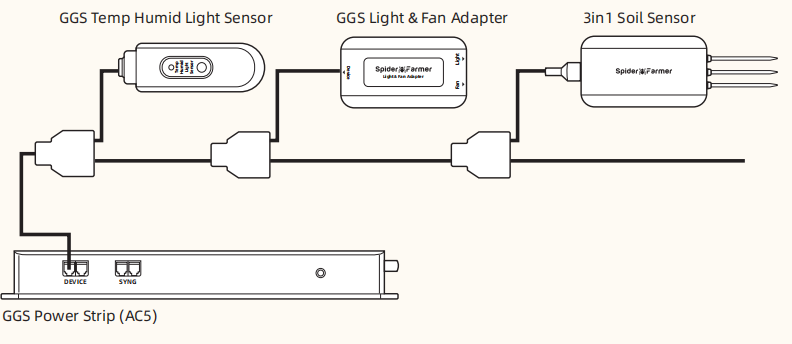
If you’ve purchased the SF-GGS-AC5 Kit, follow the diagram to connect the devices using the RJ12 cable. Make sure to plug the Light into the "light" port of the 2-in-1 adapter. Then, ensure the devices are plugged into a power source, as the RJ12 cable doesn’t supply power (the sensor only needs the RJ12 connection). After that, open the app, search for your devices, and tap the Power Strip icon to start the setup.
You can click the gear-shaped button in the top-right corner to set the temperature unit you prefer, either Celsius or Fahrenheit, and select your location to ensure your local time is correct. You can also choose to calibrate the temperature, humidity, and other settings. For more options, you can explore them within the app.
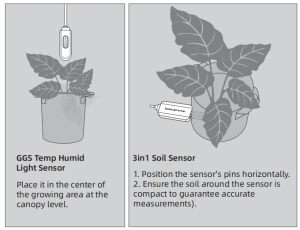
(Sensor Placement Recommendations)
Click "Environment" , you can customize when it's "day" or "night" (Day Cycle) in your grow room. Additionally, you can set your target temperature, humidity, and CO2 levels for both day and night. You can also define the threshold (Deadband) that allows for acceptable fluctuations around these target values.
Click the "Light" option in the Device section.
(The light requires a 2-in-1 adapter to connect to the GGS AC5 Power Strip. The 2-in-1 adapter is already included in the kit.)
The light settings are divided into Manual and Auto modes:
Manual Mode: This allows you to adjust the brightness of the light in real-time.
Auto Mode: This mode lets you set up the following for your light:
Time Period: The duration the light will be running.
Brightness: The brightness level of the light during operation.
Go Dark: When the temperature sensor detects that the grow space reaches the specific temperature you’ve set, the light will automatically dim to 11%.
Turn Off the Light: When the temperature sensor detects that the grow space reaches the specific temperature you’ve set, the light will automatically turn off.
Simulate: This feature can simulate sunrise and sunset. For example, if you set the light to turn on at 8:00 AM and off at 8:00 PM with the brightness at 80%, and the simulate time is set to 30 minutes, the light will gradually increase from 0% to 80% between 7:30 AM and 8:00 AM. In the evening, from 7:30 PM to 8:00 PM, the light will gradually dim from 80% to 0%.
Important Note for Inline Fans with Digital Temp/Humidity Controller:When using an Inline Fan with a digital temperature and humidity controller, and connecting it to the GGS AC5 Power Strip, do not use the fan’s sensor. Instead, use the temperature, humidity, and light sensor provided with the GGS AC5 Kit.
The GGS Power Strip has both Manual and Auto modes:
Manual Mode: You can manually turn each outlet on or off in real-time.
Auto Mode: You can set the following parameters for each outlet:
Priority Mode:
À partir de 1
J'ai rencontré de sérieux problèmes pour connecter l'appareil au Wi-Fi, malgré le fait que mon routeur utilise également la fréquence 2,4 GHz. Cependant, l'appareil lui-même est arrivé très rapidement.
Produit conforme, mais il faut avoir le matériel additionnel adéquat pour les branchement rj12 possibilité de brancher un éclairage sur la prise et de faire le minuteur, et l'info température/humidité via la sonde
'/%3E%3C/svg%3E)
Le spécialiste français du bricolage, maison, jardin
Livraison et retours gratuits pendant 100 jours avec ManoExpress. En savoir plus
Paiement jusqu'à 12x par carte bancaire avec Alma. En savoir plus
Plus de 7 millions de clients pros et particuliers