1/5
Informations produit
Description
You can edit this demo text!Basic usage: Paste your documents in the visual editor on the left or your HTML code in the source editor in the right. Edit any of the two areas and see the other changing in real time. Use the table below to test most of the featuresTitleExample 1Example 2Inline stylesUsing inline styles in your HTML document is a bad practice because they break the default styles of the website!Use classes and IDs instead! Setting margins Do not use spaces or empty paragraphs to set vertical and horizontal gaps.←| Use margin, padding, →| and line-height instead ↕ Links and imagesThis is a text link and this is an image: And this is a link image: Tables and listsFirst cellSecond columnUpper cornerBottom rowMiddle bottomRight cornerDemonstrating an ordered listThese are special characters: ♥ ☺ ★ ><item 2Floating an imageFloating with inline styleWe can float an image to the right assigning the "style" attribute and giving it the following value: margin: 0 0 5px 20px; float: right;Floating with classesWe need to avoid inline styles as much as possible. A more elegant way of floating an image along the text is through a class or ID attribute: class="imageRight"Set up the cleaning options and click the Clean button, try the Tag manager, or experiment with the Find and replace tool.You can always access this demonstration text clicking the DEMO menu item.Still Stuck With HTML5 Since 2008?It's time to start using HTML6!What is HTML6?The name might suggest that it is a new HTML version but it's even better.HTML6 is the next level HTML editor that will make your life easier and your work more efficient.Try the free DemoHTMLg RebrandedWe have been around since 2015 on HTMLg.com domain.Don't worry though, we're still hosting the best HTML editor possible, we just changed one character in the link.Purchase a LicenseHTML6 EditorConverting documents to HTML or migrating content?Automate web content editing tasks and make HTML composing Super Easy with our online editor.Become Extremely Efficient and Error-Free!Main featuresConverter – Convert your Word and other visual documents to HTML instantly.WYSIWYG – Create and edit content visually without needing to code.Live Editors – Change the visual document and the code in real-time.Cleaner – Set the cleaning options and execute them with a single click.Easy To Use – Super user-friendly and we're always here to help.No Ties – Purchasing a license is a one-time expense. No recurring payments.Suitable for EveryoneEasy to useHTML6 was designed to be easy to use with a basic understanding of the HTML code.It's a great tool for learning HTML markup.With many useful free and premium features.Easy accessNo registrationNo downloadNo installationHTML6 runs in your web browser accessing a web link, even if you have premium members' access.Premium FeaturesFor the price of a monthly beer you can access all features anytime without limitations, ads and annoying popups.No adsNo character limitSave your settingsOne-time payment without automatic renewals.Premium PlansFeatures never seen beforeThe tag filter allows you to extract or delete certain parts of tags that match your criteria.For example to list images that don't have alt attributes or delete outbound links.The tag attribute filter lets you to list or get rid of certain attributes.For example to extract all links or image files from the document.The tag manager bulk replaces and deletes your tags or their desired parts.For example replaces tables with structured divs or deletes the tag attributes of spans etc.Still Not Convinced?Try our demo and other free web design tools below.Try it for free or Purchase a LicenseUseful Links Compose – WYSIWYG HTML Editor & Cleaner – html6.com CheatSheets – Interactive HTML Cheat Sheet – HTHL Cheat Sheet.com All In 1 – The client side of the web. – html-css-js.com Tables – Generate and style HTML Tables. – HTMLtable.com Color – Pick and mix the RGB Colors – RGB Color Code.com Blog – What's News in Wed Dev? – HTML-Online.com
Caractéristiques
- MarqueBRAST
- MatièresABS
- Réf. ManoManoME219110521
- MMID763772847356
- Réf. fabricant8704565520103
- EAN8704565520103
Conseil par
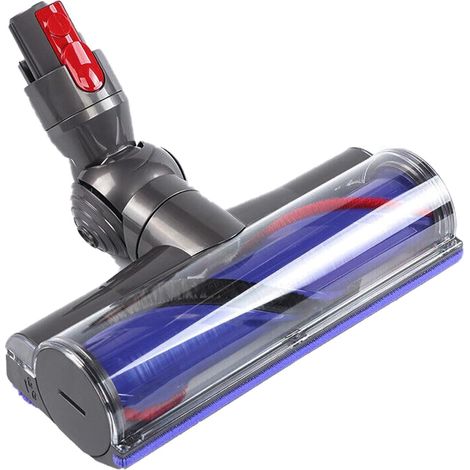
Comment choisir ses accessoires d'aspirateur ?
Un aspirateur nécessite d’accessoires pour son fonctionnement dans la durée. Sac d’aspiration, filtre à air, brosse ou encore tuyau d’aspirateur sont autant d’éléments essentiels à choisir adaptés. Pour ce faire, il faut s’assurer que les accessoires correspondent bien à la machine à équiper. On fait le point.
BRAST est votre spécialiste pour la maison, le jardin et les loisirs, qui vous surprend avec des offres innovantes d‘ une qualité exceptionnelle aux prix bien raisonnables. Un service à la clientèle qualifié et une fourniture de pièces de rechange pendant longtemps sont garantis, c‘est bien entendu.
Vous êtes ici :